Export & Reports
Generate PDF, Excel, and CSV reports of your finances. View monthly spending digests, create encrypted backups, and receive automated email summaries.
Overview
The Export & Reports screen lets you generate financial reports, view monthly digests, download/share reports, and manage data backups. Access it from the Analytics tab via the Export Report button, or from Settings > Reports & Email > Generate Report.
Report Formats
Three export formats available:
| Format | Description | Availability |
|---|---|---|
| CSV | Comma-separated values, compatible with Excel and Google Sheets | All plans |
| Formatted report with summary, category breakdown, and transaction list | All plans | |
| Excel | Multi-sheet workbook with Summary, Expenses, and Incomes sheets | All plans |
Generating reports and creating backups is free on every plan. Only the automated e-mail delivery described below needs a paid plan.
Totals are shown in your display currency — the one on the pill on the home screen, not the currency of any single transaction. Amounts recorded in another currency are converted at current rates before anything is added up, and the report says so. Each transaction in the list keeps its own currency, so you can always see what was actually recorded. If a rate is unavailable, that amount is left out of the totals rather than counted as the wrong currency, and the report says that too.
Generating a Report
- Select a format (CSV, PDF, or Excel)
- Choose a time period: - Last Week — the last 7 days - This Month — from the 1st of the month to today - Last Quarter — the last full calendar quarter (asked in August, that means April-June). A closed period, so its figures no longer move - This Year — from 1 January to today - Specific month — any single whole month out of the last 24 - Custom range — your own start and end date
- Tap Generate
- The report is generated and saved. On Android a folder picker opens and the file is written where you choose - the app then shows you the path. On iOS the share sheet opens so you can “Save to Files”. In the web app it simply downloads. Cancel the folder picker and nothing is saved; the report still waits for you below.
- The report also appears in Recent Reports below for future access
Under the buttons you can see the exact dates the report will cover — the same dates printed in the file’s header. If a custom range is incomplete, or its start is after its end, Generate stays disabled.
Opening this screen through Export Report on the Analytics tab carries the period you were looking at over with you - page back to June there and the report is prepared for June, not for the current month. A period that is still running ends today; a finished one covers its full span.
Reports are stored for 7 days and then automatically deleted.
Monthly Digest
A snapshot of your current month’s financial activity:
- Total Income and Total Expenses
- Savings Rate — percentage of income saved
- Top Categories — your biggest spending categories with amounts
- Data is cached for 7 days and refreshes automatically
- Always the current month — it does not follow the period selected above
Recent Reports
A list of your recently generated reports showing:
- Format icon (CSV/PDF/Excel)
- File name and creation date
- File size
- Download button — saves the file directly to your device (Android: choose folder via Storage Access Framework; iOS: save to Files)
- Share button — opens the system share sheet to send the report via email, messaging, or other apps
Data Backup
Available on all plans:
- Export Backup — creates a full JSON backup of your account data (expenses, incomes, budgets, categories, tags, projects, wallets, etc.)
- Where the file is saved: On Android, a folder picker opens and the backup is written to the folder you choose — the app then shows you the exact path. If you skip the picker (or on iOS), the system share sheet opens instead so you can “Save to Files”, Downloads, or a cloud drive. The success message only appears once the file is actually saved or shared.
- Restore Backup — import a previously exported backup
- If encryption is enabled, encrypted fields are included as-is in the backup
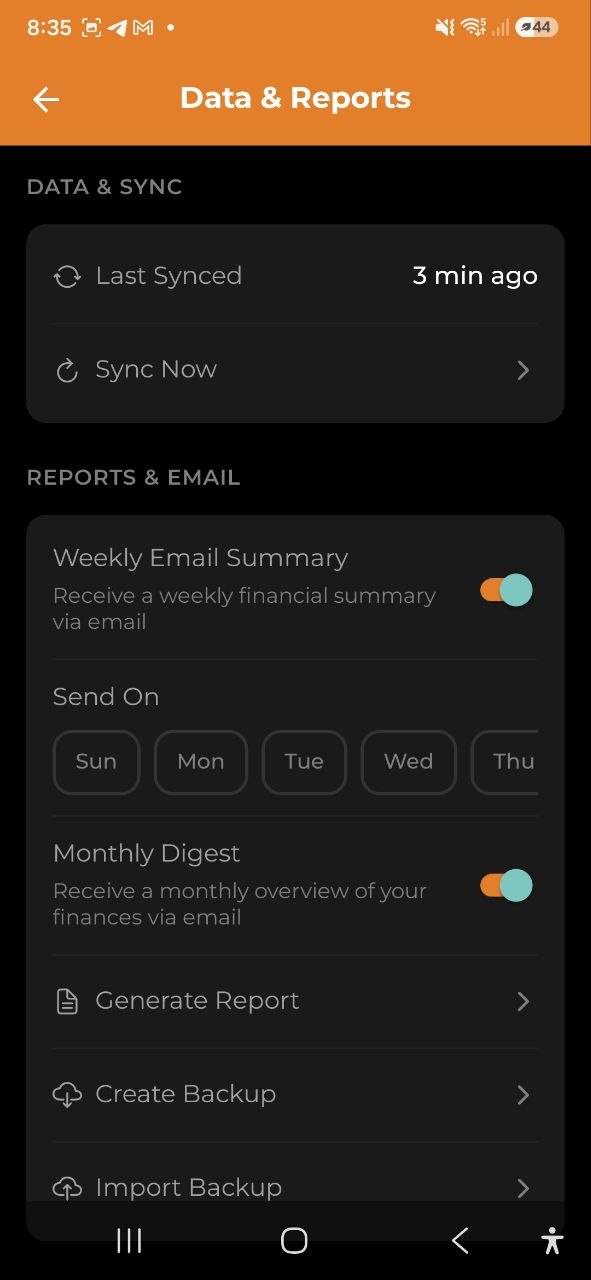
Access backup from Settings > Reports & Email.
Email Reports
Automated email summaries delivered to your inbox:
| Feature | Description | Required Plan |
|---|---|---|
| Weekly Email Summary | Weekly spending overview with top categories | Business |
| Monthly Digest Email | Monthly summary with month-over-month comparison | Pro & Business |
Configure these in Settings > Reports & Email:
- Toggle weekly/monthly emails on/off
- Choose the day of week for weekly reports (Monday by default)
Encryption & Reports
- Tier 0 (no encryption) — all data displayed correctly in reports
- Tier 1 (text encryption) — amounts show correctly; category names and descriptions may appear empty in server-generated reports. Monthly digest resolves category names from your local device data
- Tier 2 (full encryption) — reports are unavailable (amounts are encrypted server-side)
FAQ
-
Q: Why do I see empty category names in my PDF report? A: If you have E2EE enabled (Tier 1), category names are encrypted on the server. The server-generated report cannot decrypt them. Amounts remain accurate.
-
Q: How long are reports stored? A: Reports are automatically deleted after 7 days. Download them promptly after generation.
-
Q: Can I export data from a shared account? A: Yes, any account member can generate reports and backups for the shared account.
-
Q: What’s included in a backup? A: Everything: expenses, incomes, budgets, categories, tags, projects, wallets, transfers, and currency exchanges for the current account.
See also: Analytics | Settings | Subscription Plans | Encryption