Subscription Manager
Track all your recurring charges in one place — streaming services, SaaS tools, gym memberships, and more.
What is the Subscription Manager?
The Subscription Manager is a dedicated tracker for your recurring payments. Unlike transactions, subscriptions are not automatically detected — you add them manually or via the “Track this” button on a Fat Finder finding.
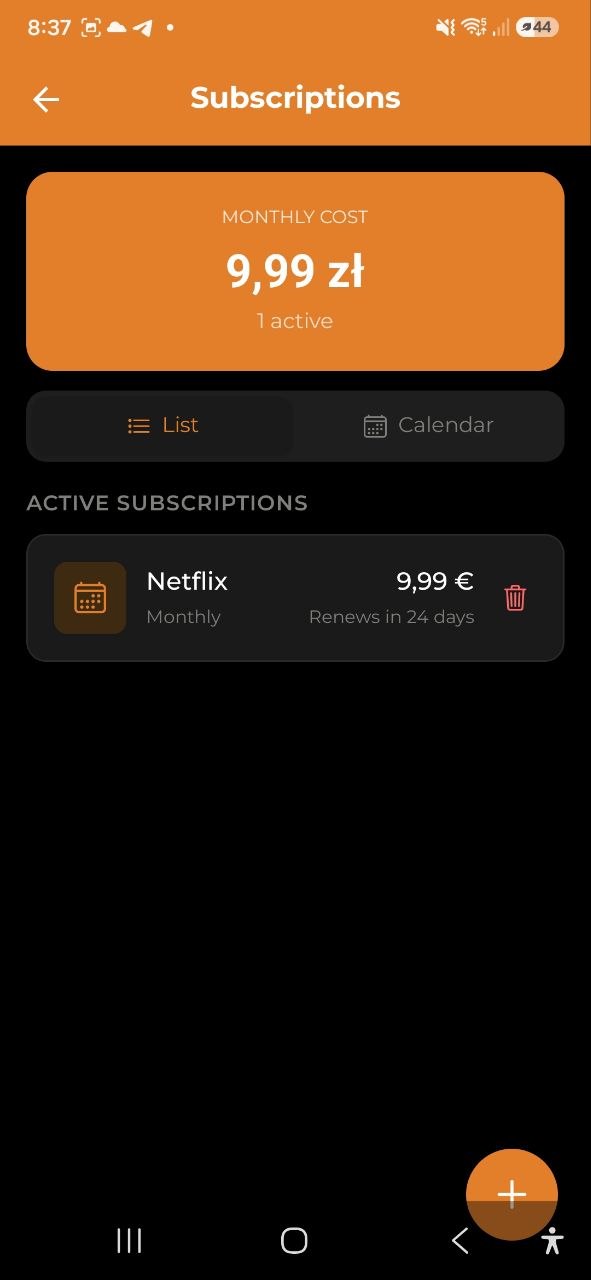
Each subscription stores: - Name (Netflix, Spotify, gym…) - Amount and currency - Billing cycle (monthly, yearly, quarterly, weekly) - Next renewal date - Category (optional) - Notes (optional)
Adding a Subscription
Manually: 1. Go to Settings → Subscriptions (or tap the Subscriptions link on the home screen) 2. Tap the + button 3. Fill in the name, amount, billing cycle, and next renewal date 4. Tap Save
From Fat Finder: If Fat Finder detects a recurring charge, tap “Track this subscription” on the finding card. The name and amount are pre-filled — just confirm the renewal date.
Monthly Cost Banner
The top of the Subscription Manager shows your total monthly equivalent cost — all active subscriptions converted to a monthly figure: - Monthly subscriptions → amount as-is - Yearly subscriptions → amount ÷ 12 - Quarterly subscriptions → amount ÷ 3 - Weekly subscriptions → amount × (52 ÷ 12)
Renewal Countdown
Each subscription shows how many days until the next renewal: - Red — overdue or renewing today - Yellow — renewing within 3 days - Normal — more than 3 days away
Renewal Notifications
You’ll receive a push notification 3 days before each renewal. To manage this:
- Go to Settings → Notifications
- Toggle Subscription renewals on or off
Editing and Deactivating
Tap any subscription to open the edit screen. You can: - Update amount, billing cycle, or renewal date - Add or change the category - Toggle Active / Inactive — inactive subscriptions stay in the list but are excluded from the monthly total - Delete the subscription entirely
Viewer Role
If your account role is Viewer, you can see the subscription list but cannot add, edit, or delete subscriptions.