Achievements & Gamification
Stay motivated with achievements, daily streaks, XP, and levels. Track your financial habits and earn badges as you build consistency.
Overview
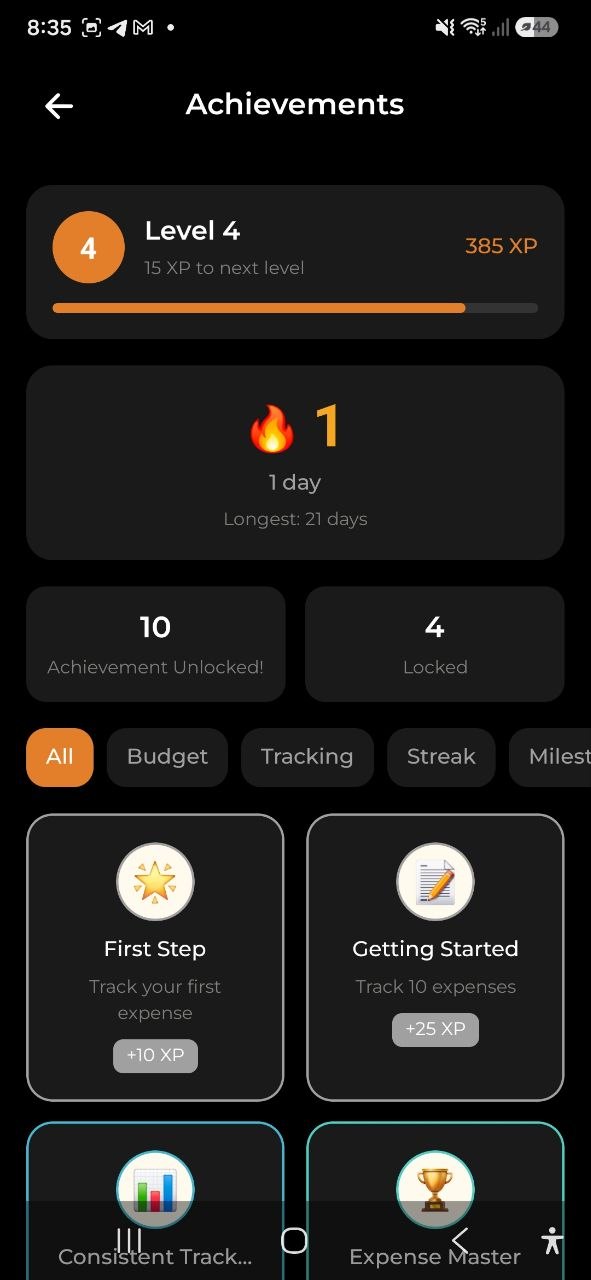
The Gamification system rewards you for consistently tracking your finances. Every expense, income, and budget you manage contributes to your progress. Earn achievements, maintain daily streaks, and level up as you build better financial habits.
Dashboard Widget
On your home screen, you’ll see a compact gamification card showing:
- Level — your current level with an XP progress bar
- Streak — your current daily tracking streak (fire emoji when active, snowflake when inactive)
Tap the widget to open the full Achievements screen.
Achievements
Achievements are milestones that reward you for specific financial behaviors. Each achievement has:
- Icon — a visual emoji representing the achievement
- Title & Description — what you need to do to earn it
- Rarity — Common, Rare, Epic, or Legendary
- XP Reward — experience points earned upon completion
- Progress — percentage towards completion (for incomplete achievements)
Achievement Categories
| Category | Examples |
|---|---|
| Milestone | Track your first expense, reach 10/50/100/500 expenses |
| Budget | Create your first budget, stay within budget for 1 or 3 months |
| Streak | Maintain a 3/7/30/100-day tracking streak |
| Savings | Record your first income, end a month with income exceeding expenses |
Viewing Achievements
- Tap the gamification widget on the Dashboard, or navigate to the Achievements screen
- Use category filters (All, Budget, Tracking, Streak, Milestone, Savings) to browse
- Tap any badge to see its full description, rarity, XP value, and your progress
Completed achievements appear in full color with their rarity border. Locked achievements appear grayed out with a progress bar.
Daily Streak
Your streak counts consecutive days that you track at least one expense or income. The streak resets if you miss a day.
- Active streak — shown with a fire emoji and the number of days
- Broken streak — shown with a snowflake emoji and a prompt to start again
- Longest streak — your personal best is tracked and displayed on the Achievements screen
Tip: Add at least one transaction every day to keep your streak going!
Tracking reminder: If you haven’t logged any expenses for 3 or more days, the app sends a push notification to nudge you back. It repeats every 3 days (day 3, 6, 9…). Toggle this in Settings → Notifications → Tracking Reminder.
XP & Levels
- Each completed achievement awards XP (experience points)
- 100 XP is needed to advance one level
- XP rewards range from 10 XP (Common achievements) to 500 XP (Legendary achievements)
- Your level and XP progress are displayed on both the Dashboard widget and the Achievements screen
Achievement Rarity
| Rarity | Color | XP Range |
|---|---|---|
| Common | Gray | 10-25 XP |
| Rare | Blue | 25-50 XP |
| Epic | Teal | 50-100 XP |
| Legendary | Gold | 100-500 XP |
Legendary achievements feature a special golden shimmer effect when unlocked.
Achievement Unlocked Notification
When you earn a new achievement (for example, after adding an expense), a celebration modal appears showing:
- The achievement icon and name
- XP earned
- A dismiss button
This notification appears automatically and does not interrupt your workflow.
FAQ
-
Q: How do achievements get tracked? A: Achievements are evaluated automatically each time you add an expense, income, or budget. No manual action is needed.
-
Q: Does my streak reset if I’m offline? A: Your streak is tracked server-side using your timezone. If you add a transaction while offline, it will be evaluated once you sync.
-
Q: Are achievements available on the Free plan? A: Yes! All achievements, streaks, and gamification features are free for all users.
-
Q: Can I see my progress toward locked achievements? A: Yes, tap any locked achievement badge to see your current progress percentage and what’s needed to unlock it.
See also: Dashboard | Expenses & Income