Invite Friends — Referral Program
Invite friends, earn bonus AI requests, and unlock milestones. Share your unique referral code and get rewarded when friends actively use the app.
Overview
The Referral Program lets you invite friends to AI Budget Assistant. When they sign up with your code and actively use the app for 7 days, you earn +30 bonus AI requests. Referred friends get an extended 14-day trial instead of the standard 7 days.
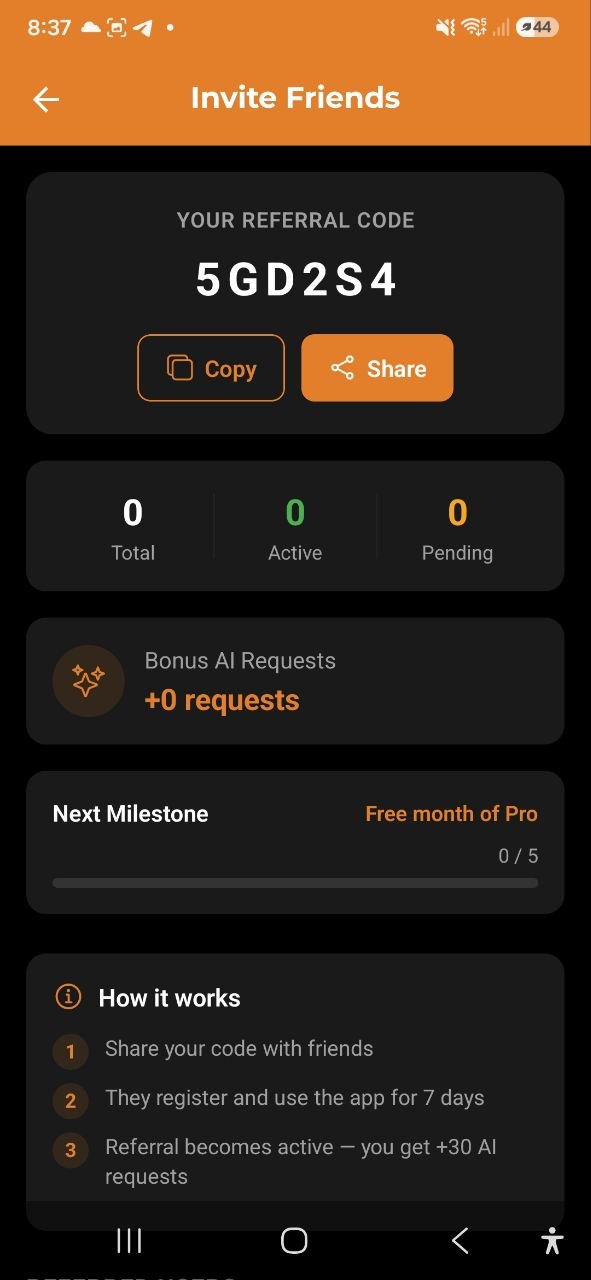
Your Referral Code
Every user has a unique 6-character referral code. You can find it on the Invite Friends screen:
- Go to Settings → Invite Friends
- Your code is displayed at the top of the screen
- Use Copy to copy the code to your clipboard
- Use Share to send it via any messaging app — the message already contains a link, and a friend who opens it has your code filled in for them
The app also offers this to you at one specific moment: after a friend has paid you back through a bill split. That is the only place it asks — and if you close it twice, it stops asking.
How It Works
- Share your code — send it to friends via any messenger or social media
- Friend registers — from your link the code is already in place; typed by hand it is an optional field
- 7-day waiting period — the referral stays in “Pending” status
- Friend uses the app — they must actively use the app (open it and add expenses) within 7 days
- Referral becomes Active — you receive +30 AI requests as a bonus
Referral Statuses
| Status | Meaning |
|---|---|
| Pending | Friend registered, waiting 7 days for activity confirmation |
| Active | Friend confirmed as active user, bonus granted to you |
| Expired | 30 days passed without friend becoming active |
Statistics
The Invite Friends screen shows your referral stats:
- Total — how many people used your code
- Active — confirmed active referrals (bonus granted)
- Pending — waiting for activity confirmation
Bonus AI Requests
For each referral that becomes Active, you receive +30 AI requests. These bonus requests are added on top of your plan’s monthly limit and do not reset each month.
Your total bonus requests are displayed on the Invite Friends screen.
Milestones
As you accumulate active referrals, you unlock milestones:
| Milestone | Reward |
|---|---|
| 5 active referrals | Free month of Pro (promo code sent to your email) |
| 10 active referrals | Ambassador badge |
Your progress toward the next milestone is shown as a progress bar on the Invite Friends screen.
Benefits for Referred Friends
Friends who register with your referral code receive:
- Extended 14-day trial (instead of the standard 7-day trial)
- The trial end date is shown on the Subscription screen
FAQ
-
Q: Where do I find my referral code? A: Go to Settings → Invite Friends. Your code is shown at the top.
-
Q: Why is my referral still “Pending”? A: Referrals stay pending for at least 7 days. The friend must also actively use the app (open it, add expenses) during that period.
-
Q: When does a referral expire? A: If the referred friend doesn’t become an active user within 30 days, the referral expires.
-
Q: Do bonus AI requests reset monthly? A: No, bonus requests from referrals are permanent and do not reset.
-
Q: Can I use my own referral code? A: No, self-referral is not allowed.
See also: Subscription | AI Chat